Getting an official notice about your ZATCA Phase 2 integration wave has a way of turning a routine compliance item into an urgent, cross-functional project overnight. Finance gets asked whether the accounting system can even do this. IT gets asked what an API integration actually involves. Management wants a timeline nobody’s built yet.
The instinct is to treat it like a software update — install something, tick a box, move on. It isn’t that. ZATCA’s Integration Phase requires structured invoice data, digital certificates, and a live connection to government systems, and getting it wrong doesn’t fail quietly — it means invoices get rejected, sales can’t legally issue documents, and the fix has to happen under deadline pressure instead of on a planned schedule.
This guide walks through the roadmap end to end: confirming scope, cleaning up data, configuring the technical pieces, testing properly, and what actually needs to happen after go-live. It’s written for the businesses doing this for the first time, not for developers already deep in the API documentation.
Quick Answer: What Does a ZATCA E-Invoicing Implementation Involve?
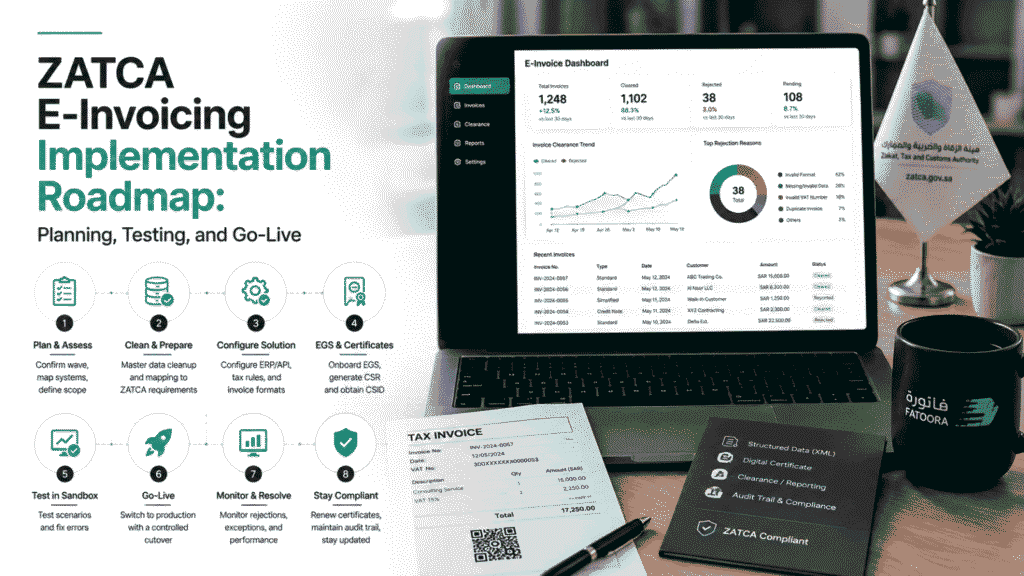
A practical ZATCA e-invoicing implementation moves through eight stages: confirming your integration wave and deadline, assessing your current invoice-generating systems, cleaning up master data and mapping it to ZATCA’s requirements, selecting or configuring the technical solution, onboarding your EGS unit and obtaining digital certificates, completing sandbox testing across real invoice scenarios, executing a controlled production cutover, and monitoring the system closely in the weeks after go-live. It’s a compliance project that touches finance, IT, and sales — not a single software setting.
Phase 1 and Phase 2 Aren’t the Same Project
Phase 1, the Generation Phase, has been in effect since December 2021. It requires businesses to generate and store tax invoices electronically — structured, but not connected to anything outside the business.
Phase 2, the Integration Phase, is a different scope entirely. It requires that e-invoicing solution to connect directly to ZATCA’s FATOORA platform: standard (B2B) invoices go through a clearance process before they’re valid, and simplified (B2C) invoices get reported after issuance. ZATCA rolls Phase 2 out in waves by taxpayer group, and notifies each wave at least six months ahead of its integration deadline.
One misconception causes more rework than any other: sending a PDF invoice by email is not e-invoicing under Phase 2. The requirement is structured XML data (UBL 2.1 format) generated by a system that can actually talk to ZATCA’s API — a PDF might be what the customer sees, but it isn’t what the platform needs to receive. Businesses that build their whole process around “the invoice looks right” without checking what’s happening underneath usually find out the hard way, during testing, that visual correctness and technical compliance are two different things.
If your business is still deciding what kind of accounting or ERP system it needs before tackling e-invoicing specifically, our guide to choosing ZATCA-compliant accounting software covers that groundwork — this article picks up from there, once a system is in place and it’s time to actually implement the integration.
The 8-Step ZATCA Phase 2 Implementation Roadmap
Step 1: Planning and Discovery
Start by confirming the integration wave and deadline that actually applies to the business — through the official ZATCA notification, not an assumption based on what’s happened to other companies. Then map every system that generates an invoice: the main ERP or accounting platform, any POS systems, e-commerce checkout flows, and — this is the one businesses miss — manual invoices created outside the primary system for one-off transactions. Do this across every branch and legal entity, not just head office.
Step 2: Gap Analysis and Master Data Cleansing
Compare what the current system captures against what ZATCA’s invoice structure actually requires, field by field. This is usually where the real work is. Customer and supplier records that have been “good enough” for years — missing VAT numbers, inconsistent Arabic business names, incomplete addresses — become blocking issues once every invoice has to pass structured validation. Cleaning this up before configuration starts is far cheaper than discovering it during testing.
Step 3: Solution Architecture and Selection
Decide whether the path forward is a native ZATCA-ready ERP module, a middleware layer connecting an existing system to FATOORA, or a custom API build. ZATCA maintains a solution provider directory — useful as a reference, but worth remembering that a provider’s presence on that list doesn’t transfer the compliance responsibility away from the taxpayer. The business is still accountable for correct tax treatment and data quality no matter which solution it runs on.
Step 4: System Configuration and EGS Onboarding
Configure tax categories, applicable VAT rates, and exemption codes to match how the business actually operates — standard-rated, zero-rated, and exempt supplies all need to be represented correctly, not defaulted. This is also where the Electronic Generation and Storage (EGS) unit gets set up and registered through the ZATCA Developer Portal — the unit that will generate and store compliant invoices going forward.
Step 5: Certificate Generation (CSR and CSID)
Generate a Certificate Signing Request (CSR) from the EGS unit, then use it to obtain a Compliance CSID — the credential used to authenticate during testing. Production API access requires a separate Production CSID, issued only after compliance checks pass. These two credentials get confused constantly; keeping them clearly separated (and knowing which environment each one authenticates against) avoids a category of avoidable errors later.
Step 6: Sandbox and Scenario Testing
Run every invoice type the business actually issues through ZATCA’s Integration Sandbox — not just the standard case. That means standard tax invoices, simplified invoices, credit and debit notes, zero-rated and exempt transactions, multi-currency invoices if relevant, and the messier real-world cases: partial payments, advance receipts, discounts, and cancellations. A system that passes testing on clean, simple invoices and has never seen a partial payment scenario is not actually tested — it’s untested with extra steps.
Step 7: Cutover and Go-Live
Obtain production credentials and work through a documented cutover checklist rather than flipping a switch. One rule matters more than the others here: never test in the production environment. Confirm the fallback or rollback procedure is documented and understood by whoever’s on call during the transition, in case something in the live environment behaves differently than the sandbox did.
Step 8: Hypercare and Post-Go-Live Monitoring
The first batch of live invoices needs active monitoring, not a “set it and check next month” approach. Build a reconciliation process that compares what the ERP recorded against what ZATCA’s API actually confirmed — a rejected invoice that doesn’t get caught and resolved quickly can quietly stack up into a real backlog.
What Causes ZATCA Integration Projects to Slip
Most delays trace back to a handful of recurring causes:
- Data quality issues — missing or inconsistent Arabic business information, incorrect tax exemption codes, or free-text tax descriptions where the system needs a structured value
- Technical failures — invalid XML formatting, problems generating the cryptographic stamp, broken UUID or hash-chain sequencing, or QR code generation errors
- Workflow gaps that only appear in production-like conditions — invoices that pass individually in testing but fail once they’re part of a full business workflow, like a partial payment or an advance receipt that the test scenarios never covered
None of these are exotic problems. They’re the direct result of testing too narrowly or starting the data cleanup too late — both fixable with more lead time, which is exactly what most projects run short on.
Common Mistakes in ZATCA E-Invoicing Projects
- Starting a few weeks before the deadline — treating a six-month notice period as a suggestion rather than a project timeline
- Assuming the software vendor owns compliance — the vendor provides the technology; the taxpayer remains legally responsible for accurate tax treatment and data
- Editing issued invoices directly, or reusing invoice numbers — a corrected invoice needs a proper credit or debit note that references the original, not a quiet edit
- Leaving test credentials active in the production environment, or testing directly against production instead of the sandbox
- Treating go-live as the finish line — compliance doesn’t end at cutover; it continues through certificate renewals, monitoring, and audit readiness
Key ZATCA Terminology
| Term | What it means |
|---|---|
| EGS | The Electronic Generation and Storage unit — the system component that generates and stores e-invoices |
| FATOORA | ZATCA’s official platform for e-invoice clearance and reporting |
| CSR | Certificate Signing Request — generated by the EGS unit to obtain digital certificates |
| Compliance CSID | The credential used to authenticate during sandbox/compliance testing |
| Production CSID | The credential used to authenticate live API access after testing passes |
| UBL 2.1 / XML | The mandatory structured data format ZATCA invoices must be generated in |
| Cryptographic stamp | A security feature confirming an invoice’s authenticity and its place in the sequence |
| Clearance | The validation process standard (B2B) invoices go through before they’re valid |
| Reporting | The process simplified (B2C) invoices go through after they’re issued |
Who Owns What: A Practical Responsibility Split
A ZATCA Phase 2 project fails more often from unclear ownership than from any single technical problem. A rough division that works for most businesses:
| Activity | Primary owner | Supporting role |
|---|---|---|
| Tax treatment and exemption rules | Finance | Tax advisor, consulted |
| ERP/API configuration | IT | Solution provider |
| Master data cleanup | Finance | IT, for system access |
| Certificate and credential management | IT | Solution provider |
| Staff training on rejections and exceptions | Finance | IT, for system walkthroughs |
| Go-live approval | Management | Finance and IT sign-off |
Your ZATCA Phase 2 Go-Live Checklist
- [ ] Integration wave and official deadline confirmed directly through ZATCA notification
- [ ] Customer, supplier, and product master data cleansed — VAT numbers and Arabic business details complete
- [ ] EGS unit registered and onboarded through the ZATCA Developer Portal
- [ ] Compliance CSID obtained and sandbox testing completed
- [ ] All applicable invoice types tested — standard, simplified, credit notes, debit notes, and edge cases like partial payments
- [ ] Error handling and reconciliation logic built into the ERP or middleware
- [ ] Production CSID generated and credentials stored securely
- [ ] Rollback and business-continuity plan documented
- [ ] Finance and sales staff trained on what a rejection looks like and how to respond
Frequently Asked Questions
Common questions about implementing ZATCA Phase 2 e-invoicing, from wave confirmation to post-go-live compliance.
No. A PDF may be what the customer sees, but Phase 2 requires structured XML (UBL 2.1) data generated and transmitted through an integrated system — visual formatting alone doesn’t meet the technical requirement.
Clearance applies to standard (B2B) invoices, which are validated by ZATCA before they’re legally valid. Reporting applies to simplified (B2C) invoices, which are submitted to ZATCA after they’ve already been issued.
You can’t edit an issued invoice directly. The correction has to go through a proper credit note or debit note that references the original invoice — that reference is what keeps the audit trail intact.
Missing the deadline carries compliance risk, and the specifics depend on ZATCA’s current enforcement guidance — confirm the implications for your business’s exact situation directly through official ZATCA channels rather than relying on general guidance.
In most cases, yes — provided it can be integrated with FATOORA through an API or middleware layer and doesn’t rely on any functionality ZATCA’s technical requirements prohibit. Whether that integration is straightforward or requires significant middleware work depends on the specific platform.
No. Phase 2 rolls out in waves based on taxpayer criteria that ZATCA defines and updates periodically — the applicable threshold and deadline for a given wave come directly from ZATCA’s notification, not from a fixed rule that applies to every business the same way. Always confirm your specific wave and deadline through official ZATCA channels.
It’s the system component — whether that’s your ERP, a middleware layer, or a dedicated e-invoicing solution — that actually generates the structured invoice, applies the cryptographic stamp, and stores it. It’s the piece that gets registered and certified with ZATCA.
Post-Go-Live Compliance Is Continuous
Reaching production is a milestone, not the end of the project. Certificates need renewal. Rejected invoice queues need active management, not periodic cleanup. Audit trails need to stay intact as the business adds new branches, systems, or invoice types over time.
Businesses that treat go-live as “done” tend to be the ones caught off guard later — by an expired certificate, a growing backlog of unresolved rejections, or a workflow change that was never tested against ZATCA’s requirements before it went live. The projects that stay compliant with the least friction are the ones where someone owns ongoing monitoring, not just the initial rollout.
If your business is approaching a ZATCA Phase 2 deadline and still mapping out what the integration actually requires, the useful starting point is a clear-eyed assessment of your current systems and data — not a vendor shortlist. Speak with Syneffo about your e-invoicing implementation to work through what your specific wave, systems, and timeline actually require. Syneffo’s e-invoicing services cover FATOORA integration end to end, and connect directly to the broader accounting automation and process automation work many of these projects touch along the way.
Related reading: Choosing ZATCA-compliant accounting software | Saudi SME accounting automation guide | Day-one compliance and finance governance for new KSA companies | How automated bookkeeping applies rules and approvals | Automated bank reconciliation: process and controls | Month-end close automation checklist


