Starting a company in Saudi Arabia comes with dozens of important decisions.
One of the most underestimated decisions is choosing the right accounting and invoicing system.
At first, the choice can seem simple.
You just need to issue invoices, track expenses, and receive payments. So naturally, many founders look for the cheapest or fastest invoicing tool available.
But in Saudi Arabia, invoicing is not just a billing function.
It is deeply tied to compliance, taxation, audit readiness, and operational scalability.
A poor software decision during the early stage often leads to painful consequences later:
- Expensive data migration projects
- Broken audit trails
- ZATCA compliance problems
- Duplicate financial records
- Manual reconciliation work
- Operational downtime during system transitions
This is why choosing an accounting platform should never be treated as a short-term decision.
The right system should support your business not only today, but also during your next stage of growth.
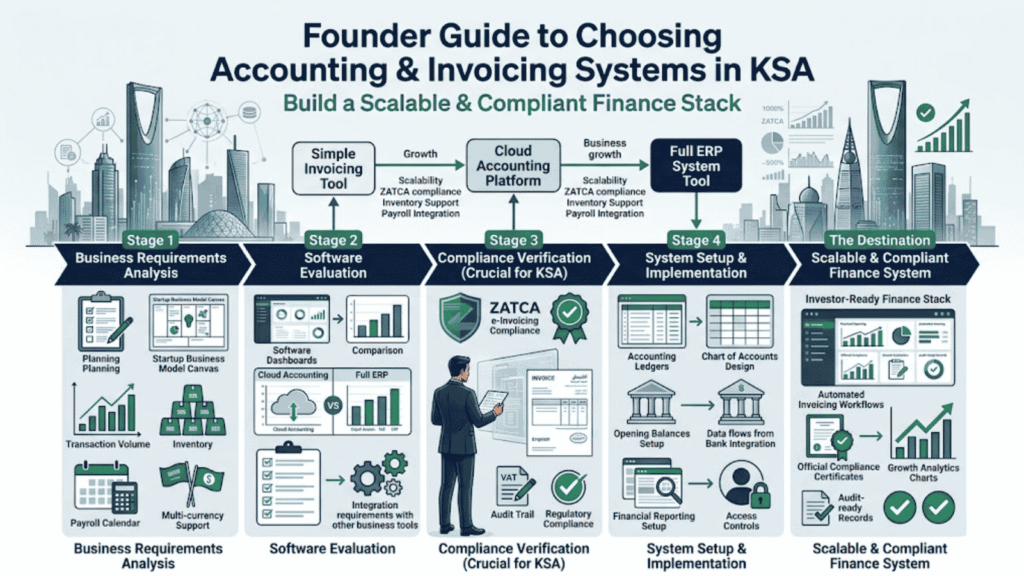
This guide provides a practical framework to help founders, finance leads, and new Saudi businesses choose accounting and invoicing systems that are compliant, scalable, and operationally sustainable.
How Do I Choose the Best Accounting Software for a New Company in Saudi Arabia?
To choose the right accounting software for a new KSA company, select a system that natively supports ZATCA Phase 2 e-invoicing and bilingual (Arabic/English) invoice output. Founders should map their chart of accounts, evaluate future requirements like inventory or payroll, and choose a scalable cloud accounting platform or ERP that can grow with the business without forcing a costly migration later.
Why “Switching Later” Is Usually a Costly Mistake
Many founders assume they can start with a basic invoicing tool and upgrade later.
On paper, that sounds reasonable.
In practice, accounting migrations are rarely simple.
Exporting data into Excel does not mean your financial records migrate cleanly.
Real accounting systems contain:
- Journal entries
- Audit histories
- Tax records
- Open invoices
- Vendor balances
- Customer ledgers
- Reconciliation records
- Multi-currency adjustments
When businesses switch systems during a growth phase, operations often become disrupted.
Finance teams spend weeks cleaning data instead of supporting the business.
The Hidden Cost of Data Migration
One of the biggest misconceptions is that accounting data is “easy to move.”
The reality is very different.
A poorly planned migration can result in:
- Missing transaction history
- Broken audit trails
- Duplicate vendors
- Inconsistent account mappings
- Incorrect VAT classifications
- Unreconciled balances
These issues become even more serious during a tax review or audit.
For businesses operating in Saudi Arabia, this risk is amplified because invoicing systems are directly connected to regulatory compliance.
Why Compliance Matters When Choosing Software in Saudi Arabia
In Saudi Arabia, accounting software is no longer just a finance tool.
It is part of your compliance infrastructure.
Zakat, Tax and Customs Authority (ZATCA) has implemented strict e-invoicing regulations that require businesses to generate compliant electronic invoices and maintain structured reporting standards.
This means your software must support:
- ZATCA Phase 2 integration
- QR code generation
- Arabic invoice requirements
- VAT reporting
- Audit-friendly reporting structures
A bookkeeping tool without proper Saudi localization usually creates operational workarounds later.
And workarounds almost always create risk.
When Should a Startup Choose an ERP Instead of Basic Accounting Software?
Not every company needs a full ERP system immediately.
But some businesses absolutely should avoid lightweight tools from day one.
Cloud Accounting Is Usually Enough For:
- Service-based startups
- Agencies
- Consultancies
- Professional services firms
- Small e-commerce operations
- Businesses with simple inventory
These companies often succeed with cloud accounting platforms that provide:
- Expense tracking
- VAT reporting
- Invoice generation
- Bank reconciliation
- Financial reporting
ERP Systems Make Sense Earlier For:
- Manufacturing companies
- Distribution businesses
- Multi-warehouse operations
- Multi-entity corporate groups
- Large inventory environments
- Complex procurement workflows
These businesses usually require deeper operational integration between:
- Inventory
- Purchasing
- Accounting
- Sales
- Payroll
- Operations
Starting with an ERP early can prevent painful restructuring later.
How to Evaluate and Set Up Your Accounting System Properly
Step 1: Map Your Business Requirements Before Looking at Brands
Many founders evaluate software backwards.
They start by comparing popular brands before understanding their actual operational needs.
Instead, begin with your business model.
Ask questions like:
- How many invoices will we process monthly?
- Will we hold inventory?
- Do we need payroll integration?
- Will we operate across multiple branches?
- Do we transact in multiple currencies?
- Will we require approval workflows?
- Do we expect rapid scaling?
Your operational complexity determines the type of software you actually need.
Step 2: Verify ZATCA and Local Compliance Support
This step is critical.
Any accounting or invoicing platform you choose should support:
- ZATCA Phase 2 requirements
- Arabic and English invoices
- VAT-ready reporting
- Saudi tax compliance workflows
Do not assume global software automatically supports Saudi localization properly.
Always verify directly.
Step 3: Design Your Chart of Accounts Correctly
A Chart of Accounts (CoA) is the backbone of your financial reporting.
Many startups ignore this early and simply use the software’s default account structure.
That becomes a major problem later.
Poor account structures lead to:
- Messy financial reports
- Weak investor reporting
- Tax confusion
- Difficult audits
- Inaccurate profitability tracking
A proper CoA should reflect your industry and business operations clearly.
For example:
A logistics company and a SaaS company should never use the exact same account structure.
Step 4: Establish Clean Opening Balances
Your accounting system should begin with clean financial records.
This includes properly documenting:
- Initial capital injections
- Founder expenses
- Setup costs
- Shareholder loans
- Opening bank balances
This creates a reliable financial starting point for future audits and reporting.
Common Mistakes Founders Make When Selecting Accounting Systems
Choosing Software Based Only on UI Design
A sleek interface does not guarantee operational suitability.
Many founders prioritize aesthetics over compliance and scalability.
In Saudi Arabia, compliance capabilities matter far more than visual design alone.
The “Invoicing-Only” Trap
Some businesses buy standalone invoicing tools without full accounting functionality.
This creates separation between:
- Sales records
- Expense tracking
- Tax reporting
- Financial statements
Eventually, manual reconciliation becomes unavoidable.
Ignoring the Chart of Accounts
Using default account structures without customization creates reporting chaos later.
Investors and auditors expect financial clarity.
Poor categorization makes that difficult.
Creating Isolated Systems
Your accounting software should integrate properly with:
- CRM platforms
- POS systems
- Payroll tools
- Inventory systems
- Banking systems
Disconnected software creates duplicate work and inconsistent data.
Migration Problems That Growing Businesses Commonly Face
Lost Audit Trails
When companies switch systems, transaction-level history is often lost or partially transferred.
This creates serious audit concerns.
Duplicate Master Data
Poorly maintained systems usually contain:
- Duplicate vendors
- Inconsistent customer names
- Incorrect inventory classifications
Cleaning this data during migration becomes time-consuming and expensive.
Operational Downtime
Many migrations require temporary invoicing freezes while data is transferred.
For fast-growing companies, this disruption can affect cash flow directly.
Practical Software Fit Comparison
| System Type | Best For | Risk Factor |
| Simple Invoicing Tools | Freelancers and very small consultancies | Often lacks full accounting functionality and usually requires migration later |
| Cloud Accounting Platforms | Most startups, agencies, service businesses, light inventory | Advanced manufacturing or payroll may require additional modules |
| Full ERP Systems | Manufacturing, distribution, multi-entity operations | Higher implementation cost and steeper learning curve |
Important Saudi Compliance Entities You Should Understand
Zakat, Tax and Customs Authority (ZATCA)
ZATCA governs:
- E-invoicing standards
- VAT reporting
- Tax compliance
- Audit requirements
Your software must align with these requirements from the beginning.
Ministry of Commerce (MOC)
The Ministry of Commerce oversees corporate recordkeeping connected to your Commercial Registration.
Accurate financial reporting supports overall compliance obligations.
Ministry of Investment (MISA)
Foreign-owned entities often require reliable financial reporting to maintain compliance with investment licensing obligations.
Local Implementation Partners
Even strong global accounting platforms often require local Saudi implementation expertise.
Localization matters.
Especially for:
- Arabic invoices
- Tax configuration
- Workflow setup
- Financial reporting standards
The “Avoid Migration” Checklist
Before committing to any accounting platform, confirm the system supports:
- ZATCA Phase 2 integration
- Arabic and English invoice generation
- Multi-currency transactions
- Custom Chart of Accounts structures
- Payroll or inventory scalability
- API integrations
- Audit-ready reporting
- Bank reconciliation workflows
- Cloud accessibility
- User permission controls
A slightly higher upfront investment is usually far cheaper than rebuilding your financial infrastructure later.
Frequently Asked Questions
Common questions from founders selecting accounting and invoicing systems.
-
Verify that the provider explicitly supports ZATCA Phase 2 integration requirements, not just QR code generation.
Ask for real implementation examples if possible. -
For most startups and service businesses, cloud accounting platforms are sufficient. However, an ERP is often the smarter long-term decision for businesses with:
- Manufacturing
- Multi-location inventory
- Complex logistics
- Multi-entity operations
-
The most difficult data to migrate accurately includes:
- Historical audit trails
- Journal entries
- Open invoices
- Tax records
- Reconciliation histories
-
The founder should define operational and reporting needs. However, a qualified accountant or implementation advisor should validate:
- Compliance capabilities
- Financial structure
- Tax configuration
- Scalability requirements
Conclusion
Choosing accounting software is not just a technical decision.
It is an operational strategy decision.
The system you select today will shape:
- Your reporting quality
- Tax compliance
- Audit readiness
- Operational efficiency
- Scalability
The cheapest tool is rarely the cheapest long-term solution.
Businesses that invest early in structured financial systems usually avoid the painful migrations, operational downtime, and compliance risks that slow down growth later.
Before selecting software, take the time to:
- Map your business model
- Structure your Chart of Accounts
- Verify ZATCA compatibility
- Evaluate future scalability
That preparation will save significant time, money, and operational stress later.
Written by Syneffo solutions
Syneffo solutions helps founders and growing businesses build scalable operational foundations in Saudi Arabia.
From finance governance and accounting infrastructure to ERP implementation and compliance readiness, our team supports businesses that want to scale with confidence while staying fully aligned with Saudi regulatory requirements.


