
Payroll Automation in Saudi Arabia: How Automated Payroll Actually Works
Most payroll problems in Saudi Arabia don’t start with the calculation. They start earlier — with an attendance sheet that never made it to the payroll file, a bonus that was approved over WhatsApp and never logged, or an employee’s GOSI status that changed last month and nobody updated the record. By the time payroll runs, the software is doing exactly what it was told to do. The inputs were already wrong.
That’s the part most “what is payroll automation” articles skip. Automating payroll isn’t really about making the calculation faster — Excel can already do gross-to-net math in seconds. It’s about controlling what feeds into that calculation, catching the errors before anyone gets paid, and keeping a record of who approved what. For a Saudi business, that control layer also has to hold up against Wage Protection (Mudad), GOSI, and Qiwa-linked employment data.
This guide walks through how automated payroll actually works end to end — what data it needs, where it catches mistakes, who still has to sign off, and how it fits Saudi Arabia’s compliance requirements.
Quick Answer: What Is Payroll Automation in Saudi Arabia?
Payroll automation in Saudi Arabia is the use of connected systems to collect employee data, validate payroll inputs, calculate salaries, route approvals, generate payslips, and support compliance reporting. The real benefit isn’t a faster calculation — it’s tighter control over payroll inputs, approvals, exceptions, and the compliance requirements tied to GOSI, Mudad, WPS, and Qiwa-documented employment records.
The Payroll Automation Workflow at a Glance
- Collect employee and contract data
- Import attendance and leave records
- Validate payroll inputs
- Calculate gross-to-net pay
- Flag exceptions
- Route approvals
- Finalize and generate payroll outputs
- Submit WPS/Mudad compliance files
- Maintain the audit trail
The section below walks through each of these in more depth — what’s actually happening at each stage, and where the control points are.
What Is Payroll Automation, Exactly?
Payroll automation is the use of connected systems to collect, validate, calculate, and process employee pay, while routing exceptions and approvals to the right people instead of removing human review entirely.
It reduces the manual re-keying of attendance, leave, and salary data, and it applies consistent rules to every payroll run. What it doesn’t do is replace the judgment calls — an unusual bonus, a disputed absence, a new joiner’s first paycheck — that still need a human to say yes.
What software actually automates vs. what still needs a person
| Automated by the system | Still requires human review |
|---|---|
| Pulling attendance and leave balances from source systems | Approving unexcused absences or disputed overtime |
| Applying configured salary rules and standard deductions | Reviewing salary changes that fall outside the normal range |
| Calculating gross-to-net pay for every employee | Final sign-off on the payroll register before payment |
| Generating payslips and the payment/Mudad file | Updating payroll rules after a labor law or GOSI change |
| Flagging missing or inconsistent data | Deciding how to handle a flagged exception |
The distinction matters because it sets expectations correctly. Automation removes repetitive work. It doesn’t remove accountability for the payroll outcome — and for a Saudi employer, that accountability sits with the company, not the software vendor.
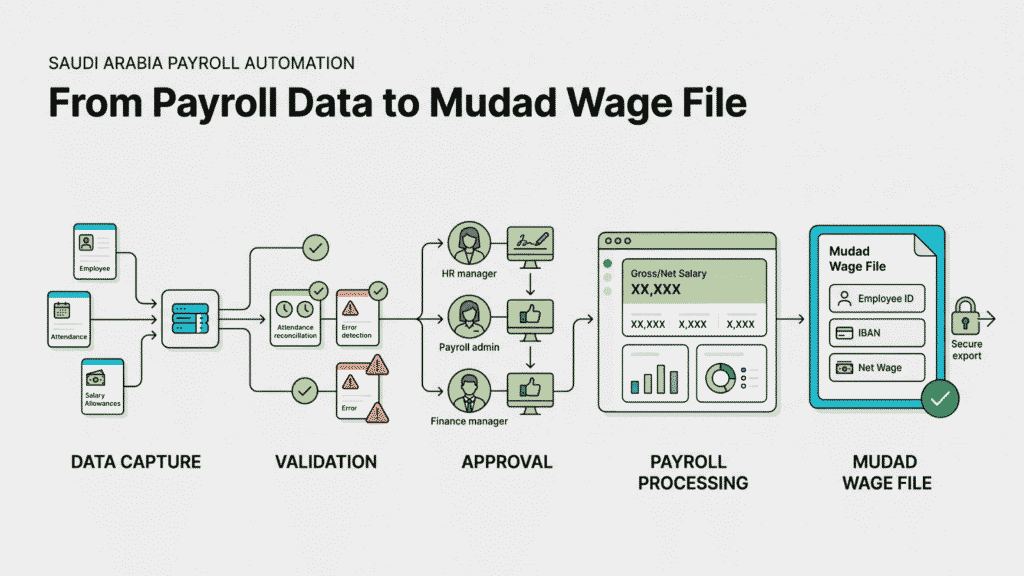
How Payroll Automation Works, Step by Step
A working payroll automation setup follows roughly the same sequence regardless of company size. What changes is how much of each step is manual versus system-driven.
- Capture employee and contract data. Base salary, allowances, bank details, and employment terms — ideally sourced from the documented Qiwa contract rather than a separate HR spreadsheet.
- Pull in variable inputs. Attendance, approved leave, and overtime feed in automatically from time-tracking or HR systems instead of being typed in manually each cycle.
- Validate before calculating. The system checks for missing bank details, duplicate employee records, negative leave balances, or values outside expected ranges.
- Calculate gross-to-net. Salary rules, allowances, overtime, and deductions are applied consistently across every employee.
- Flag exceptions. A salary that jumps 20–30% month over month, a new joiner with no GOSI record, or an unusually high deduction gets routed for review rather than processed silently.
- Route for approval. HR and finance review the payroll register — not line by line, but focused on what the system flagged.
- Finalize and generate outputs. Once approved, the run is locked. Payslips, the accounting journal entry, and the wage file for Mudad submission are generated from the same approved data set.
- Keep the audit trail. Every change, approval, and exception is recorded — who touched what, and when.
The value isn’t any single step. It’s that each step depends on the one before it being correct, which is exactly why input quality and approval discipline matter more than which software you buy.
Who Approves What in an Automated Payroll Process?
Automation speeds up the workflow. It doesn’t decide who’s accountable for each decision inside it — that’s still a business design choice, and it’s worth writing down rather than leaving implicit. A common ownership structure looks like this:
| Activity | Typical owner |
|---|---|
| Attendance approval | Line manager |
| Leave approval | HR |
| Bonus or one-time adjustment approval | Department head |
| Payroll register review | HR and finance jointly |
| Final payroll release | An authorized approver (often finance lead or founder) |
| Payroll rule changes (after a GOSI/labor law update) | Finance or an external compliance advisor |
The exact names change by company size — in a small business, the founder may sit in two or three of these rows. What matters is that each row has one clear owner, because “everyone reviews it” tends to mean no one actually catches the exception.
What Data Does Automated Payroll Actually Need?
Before a business automates anything, it’s worth mapping what payroll actually consumes as input. Most implementation delays trace back to gaps here, not to the software itself.
- Employee and contract data — legal name, ID/Iqama details, job title, and the salary and terms as documented in the employment contract
- Salary components — basic wage, housing allowance, transport and other fixed allowances
- Attendance and overtime — hours worked, and overtime calculated against the applicable rate
- Leave — approved annual leave, sick leave, and any unpaid leave affecting the pay period
- Deductions and adjustments — loan repayments, advances, disciplinary deductions, and one-off adjustments
- Joiners, exits, and changes — new hires, resignations, terminations, and salary revisions, each with its own approval trail
- Statutory inputs — the GOSI contribution basis and status for each employee
If any of these are still living in a spreadsheet that isn’t connected to the payroll system, automating the calculation step alone won’t fix much — the business has just automated the processing of bad data.
How Payroll Connects to the Rest of the Business’s Systems
Payroll rarely sits alone. It’s usually the point where several other systems’ data has to line up correctly for a single number — an employee’s net pay — to be right.
- HRIS or HR records — the source of employee master data, contract terms, and organizational structure
- Attendance and time-tracking systems — feed hours worked, overtime, and leave into the calculation
- Accounting software — receives the payroll journal entry once a run is approved, so payroll costs land in the right ledger accounts
- Employee self-service portals — where staff view payslips and, in better setups, flag discrepancies before they escalate
- Government platforms — Mudad, GOSI, and Qiwa, which payroll outputs need to align with rather than duplicate
The more of these that exchange data automatically instead of through manual export/import, the fewer places an error can slip in unnoticed. A business doesn’t need every system integrated on day one — but it’s worth knowing which connections are manual today, since those are the weak points.
How Payroll Automation Actually Prevents Errors
“Reduces errors” is the most repeated claim in payroll marketing and the least explained. In practice, error prevention comes from four specific mechanisms, not from the software being generally smarter.
Input validation. The system rejects or flags obviously wrong data at the point of entry — a missing IBAN, a negative leave balance, text in a numeric field — before it ever reaches the calculation stage.
Rule-based exception flags. Thresholds catch what a person reviewing hundreds of payslips would likely miss: a salary that’s 30% higher than last month, a new deduction that wasn’t there before, overtime that exceeds a sensible cap for the role.
Separation of duties. The person who logs a bonus or a manual adjustment generally shouldn’t be the same person who gives final approval on the payroll run. This is a workflow design choice, not a technical feature, but a good system enforces it.
Version and audit tracking. Every edit to payroll data is logged with who made it and when. This closes the “ghost edit” problem — a change made after review that nobody can trace back.
None of this eliminates human error entirely. What it does is move error detection earlier, from “an employee complains about their payslip” to “the system flags it before payment goes out.”
Where Payroll Delays Actually Come From
When payroll slips past the deadline, the cause is almost never the calculation engine. It’s usually one of these:
- Attendance mismatches — unreconciled timesheets or missing punch-ins that block the overtime calculation
- Approval bottlenecks — a bonus or one-time deduction sitting in someone’s inbox because the approval chain isn’t defined
- Compliance uncertainty — a recent change to a GOSI rule or labor regulation that the team hasn’t yet confirmed how to apply
- Missing master data — a new joiner without complete bank or contract details, discovered the day payroll is due to run
Each of these is a process gap, not a software gap. Automation helps by surfacing them earlier in the cycle — days before the run, not hours before payment.
Payroll Calendar Controls
A surprising number of “software problems” are actually calendar problems — the payroll cycle wasn’t given enough lead time for the inputs to arrive, get checked, and get approved before the payment deadline. A working calendar usually builds in:
- A cutoff date for attendance, leave, and overtime submissions, set a few working days before the calculation runs — not the same day
- A fixed review window for HR and finance to check the payroll register, separate from the day it’s generated
- A buffer before the WPS/Mudad submission deadline, so a flagged exception doesn’t turn into a late compliance filing
- Built-in time for new joiners and exits, since these usually need extra manual verification regardless of how automated the rest of the run is
Automation doesn’t remove the need for a calendar — if anything, it makes the calendar matter more, because a system that runs on schedule will happily calculate payroll from incomplete data if nobody has enforced the cutoff.
Payroll Automation and Saudi Compliance: Where It Connects
Saudi payroll doesn’t run in isolation from the government platforms that oversee wages and employment. An automated setup needs to account for how these systems fit into the workflow — not necessarily through a live API connection, since that depends on the specific software and integration in place, but at minimum through correctly structured outputs.
MHRSD, Mudad, and the Wage Protection System (WPS). Saudi Arabia’s Ministry of Human Resources and Social Development (MHRSD) requires registered establishments to submit wage data through Mudad as part of the Wage Protection Program. An automated payroll process should produce wage data in the format Mudad expects, generated from the same approved payroll register rather than re-keyed separately — re-keying is exactly where mismatches between what employees were paid and what was reported tend to appear.
GOSI. Social insurance contributions are calculated as part of gross-to-net processing. Because contribution rules apply differently depending on employee category and have changed in recent years, the payroll configuration needs to be reviewed periodically against current GOSI requirements rather than assumed to be set-and-forget.
Qiwa. Employment contracts documented electronically through Qiwa are increasingly the reference point for salary terms and — depending on current requirements — for Saudization/Nitaqat calculations. Payroll data that’s sourced from the Qiwa-documented contract, rather than a parallel HR record, reduces the chance of the two falling out of sync.
Saudi Labor Law inputs. Overtime, annual leave accrual, and end-of-service benefits (EOSB) all follow specific calculation rules under Saudi labor regulations. These need to be configured correctly in the payroll rules — and re-checked whenever an employee’s tenure crosses a threshold that changes their entitlement.
None of this replaces legal or HR advisory guidance for a specific business situation — treat the above as the operational shape of the requirement, not a substitute for checking current MHRSD, GOSI, and Qiwa guidance for your specific case.
A Pre-Pay Validation Checklist
Before any payroll run is locked and approved, this is the minimum worth checking:
- [ ] Employee master data is complete — no missing bank details, IDs, or contract terms
- [ ] All timesheets, attendance records, and leave requests are approved for the period
- [ ] GOSI status is confirmed for any new joiners or role changes
- [ ] Overtime and bonus exceptions have been reviewed, not just auto-approved
- [ ] Total payroll variance vs. last month has been checked — investigate anything above a set threshold
- [ ] The WPS/Mudad file has been validated against the approved payroll register before submission
Post-Payroll Reconciliation Matters Just as Much
Most of the attention in payroll automation goes to getting the run out the door correctly. What gets skipped is checking, after payment, that everything actually landed where it should have. A short reconciliation step after each cycle should compare:
- Payroll register totals against what was actually disbursed
- Accounting entries against the payroll journal that was generated
- Bank payment records against the approved payment file
- GOSI-related calculations against what was submitted for the period
- The WPS/Mudad submission against the payroll register it was built from
This isn’t about re-doing the payroll run — it’s a five-line comparison that usually takes minutes. Its real value shows up over time: recurring mismatches in the same place are a signal that a specific input or integration needs fixing before the next cycle, not just this one. The same discipline applies to the month-end close that payroll feeds into — reconciling early is what keeps that close from slipping.
What Automation Can’t Fix on Its Own
This is worth saying plainly, because it’s where a lot of implementations go wrong: automating payroll doesn’t fix bad underlying data or an undefined approval process. It processes them faster.
A business that automates before cleaning up employee master data ends up with automated errors instead of manual ones — often harder to catch, because the output looks polished. And a system with no defined approval hierarchy doesn’t create one on its own; someone still has to decide who approves what, and configure the workflow to enforce it.
The businesses that get the most out of payroll automation are usually the ones that treat it as a process and data-quality project first, with the software as the mechanism that enforces the process — not the other way around.
Are You Ready to Automate Payroll?
There’s no fixed employee-count threshold for this. A better test is whether any of the following sound familiar:
- Payroll depends on cross-referencing multiple spreadsheets each cycle
- Attendance data gets re-typed into the payroll file instead of flowing in
- Approvals for bonuses or adjustments happen over email or WhatsApp with no record
- The same type of correction comes up almost every month
- Compliance reporting means re-entering data that already exists somewhere else
- HR and finance spend real time each cycle reconciling who-said-what rather than reviewing exceptions
One or two of these is a process fix. Several at once usually means the manual work has outgrown what a spreadsheet-based process can reliably control — and that’s the point where mapping a proper workflow, before picking software, pays off.
Getting There: What Implementation Actually Involves
Moving from manual or semi-manual payroll to a controlled, automated workflow generally follows a similar sequence:
- Assess the current process — where data comes from, who approves what, and where the actual bottlenecks are
- Map the target workflow, including approval ownership at each stage
- Clean employee and contract master data before anything is automated
- Configure salary rules, deduction logic, and exception thresholds
- Test the configuration against a recent completed payroll run to compare outputs
- Run in parallel with the existing process for at least one cycle before fully switching
- Go live, then monitor closely for the first two to three cycles
For a business already stretched thin on finance headcount, this kind of build-and-implementation work is often what a payroll and GOSI onboarding process and a set of documented approval SOPs are meant to solve before the automation layer goes on top — automating a process that was never written down tends to just automate the confusion.
Frequently Asked Questions
Payroll automation uses connected systems to collect employee and payroll data, validate it, calculate wages, and route exceptions for approval — reducing manual data entry while keeping human review in place for anything unusual.
Through input validation at the point of entry, rule-based flags for unusual changes, separation of duties between who enters data and who approves it, and a full audit trail of edits and approvals.
No. It handles repetitive calculations and data transfer, but exceptions, new joiners, disputed items, and final approval still need a person.
Employee and contract data, salary components, attendance and overtime, leave, deductions and adjustments, and records of joiners, exits, and salary changes.
A properly configured system generates wage data in the format Mudad requires, drawn from the same approved payroll register used for payslips — rather than the data being re-entered separately for compliance reporting.
It can, provided the system is configured for the applicable contribution rules and that configuration is reviewed periodically, since GOSI rules have changed over recent years.
Electronically documented employment contracts in Qiwa are increasingly the reference source for salary terms and employment status, so payroll data drawn from that record — rather than a separate HR file — stays more consistent.
Yes, though the right level of automation depends on employee count, payroll complexity, and what systems are already in place. A small team may only need validation and approval workflows added to an existing process rather than a full platform change.
It depends mainly on data quality and how many systems need to connect — cleaning up employee master data is typically the longest step, not the software configuration itself.
Yes. Running the new automated process alongside the existing one for at least one full cycle is the most reliable way to catch configuration issues before they affect an actual paycheck.
Payroll software calculates salaries. Payroll automation is the broader system around it — validation rules, approval workflows, system integrations, exception handling, and audit controls — that determines whether the software’s output can actually be trusted.
It can reduce the operational errors that lead to compliance problems — missing WPS files, mismatched GOSI data, incomplete records — but compliance still depends on the payroll rules being configured correctly and reviewed as regulations change. Automation supports governance; it doesn’t replace it.
At minimum, whenever a relevant GOSI or labor law rule changes, plus a periodic review — many businesses do this alongside a routine payroll or compliance audit rather than waiting for an external trigger.
Where to Go From Here
Payroll automation is ultimately a control system, not just a calculation system. The businesses that get the most out of it define the process first — inputs, approval ownership, validation rules, exception handling, and compliance responsibilities — and then implement software that enforces it. Software can enforce a good process. It can’t create governance where none exists.
If your payroll process still depends on spreadsheets, disconnected approvals, or a workflow nobody has fully documented, that’s the starting point — not the payroll software itself. A structured process, with clear ownership and compliance checkpoints, usually delivers more value on its own than automation layered on top of a broken one.
Talk to Syneffo about reviewing your current payroll workflow, approval process, and compliance controls before planning a payroll automation project.
Related reading: SOPs for company setup — approvals, purchasing, expenses, and payroll | GOSI registration guide for Saudi employers | Day-one compliance and finance governance for new KSA companies | How automated bookkeeping applies rules and approvals | Startup operations stack for Saudi Arabia | Month-end close automation checklist


