
By Syneffo Solutions Compliance Team | KSA Market Entry & Business Automation Specialists Updated: May 2026 | 11 min read
Expanding into Saudi Arabia is one of the most compelling strategic decisions a founder can make right now. The Vision 2030 reforms have opened the market in ways that weren’t possible just a few years ago, and the government’s push to attract foreign investment is backed by real infrastructure — digital portals, integrated registries, and faster processing than ever before.
But there’s a catch that catches nearly every first-time founder off guard: the same digital efficiency that makes Saudi Arabia’s business setup faster also makes it less forgiving. Automated cross-referencing systems don’t make allowances for “obvious” name abbreviations or “minor” document inconsistencies. A mismatch that a human reviewer might overlook triggers an immediate flag in the system — and resets your timeline.
The good news is that almost every common setup mistake is entirely preventable. The errors that cause month-long delays are rarely caused by complex regulatory problems. They’re caused by administrative oversights that a proper pre-submission audit would have caught.
This guide walks through the most common company setup mistakes in the Kingdom of Saudi Arabia, explains exactly why each one causes a rejection, and gives you the step-by-step fix to get back on track — or better, to avoid the problem entirely.
About This Guide: This content draws on Syneffo Solutions‘ direct experience helping foreign investors navigate company setup in Saudi Arabia across technology, professional services, trading, and healthcare sectors. The mistakes and fixes described here are the ones we encounter most regularly with our own clients.
What Are the Most Common Company Setup Mistakes in Saudi Arabia?
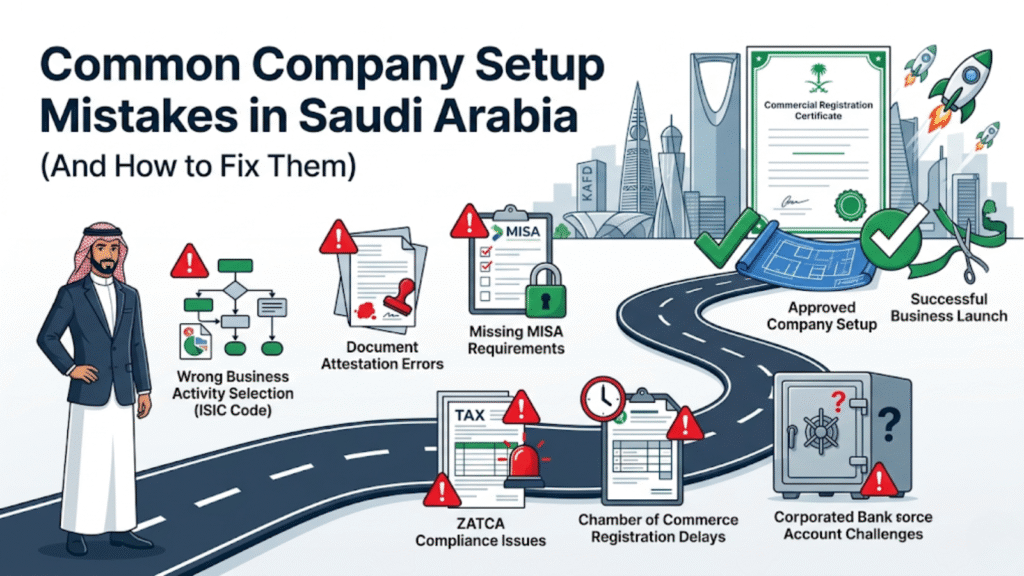
The most common company setup mistakes in KSA include inconsistent spelling of shareholder names across passports and corporate documents, submitting foreign corporate records without completing the full attestation chain, choosing ISIC business activity codes that are too broad or misaligned with the actual business model, and treating the Commercial Registration (CR) as the finish line while leaving mandatory post-incorporation tax, banking, and labor compliance setups incomplete.
The Registration vs. Readiness Gap
Before getting into specific mistakes, it’s worth addressing the single biggest misconception founders bring into the Saudi setup process: the idea that “online filing means instant approval.”
The Saudi Business Center has genuinely simplified the submission process. Documents that once required physical visits to multiple government offices can now be uploaded digitally. But digital submission is not the same as digital approval. Human oversight, rigorous compliance checks, and cross-border verification still govern the actual timeline — and they should, because they protect the integrity of the system.
The second misconception is equally costly: that getting a Commercial Registration (CR) means you’re ready to operate. It doesn’t.
Your CR number means your entity legally exists. It does not mean you can issue a VAT invoice, clear imported goods through customs, sign a commercial contract, or hire your first employee. Those capabilities come from the post-CR compliance layer — ZATCA registration, GOSI setup, SPL National Address certification, and corporate banking onboarding — each of which has its own requirements and timeline.
Founders who understand this distinction from day one structure their setup as a single continuous workflow. Founders who discover it after receiving the CR spend the next four to six weeks completing steps they thought were already behind them.
How to Fix a Rejected Application: The Remediation Framework
If your application stalls or you receive an error code from a government portal, the temptation is to resubmit quickly and hope the problem resolves itself. It won’t. Resubmitting a flawed application doesn’t fix the root issue — it just generates another rejection and extends your timeline further.
The right approach is methodical.
Step 1: Identify Which Regulatory Layer Has Flagged the Application
Is the rejection coming from MISA during the investment license review? From the Ministry of Commerce during the AoA review? From a local bank during corporate KYC? Each layer has a different correction workflow, and trying to fix a MOC rejection by amending your MISA application won’t help.
Pull the exact error note or rejection code from the portal. Saudi government portals generate specific localized error codes — these are your diagnostic starting point.
Step 2: Fix the Root Document, Not the Portal Entry
This is where most founders waste time. If the underlying document has an error — a name spelled differently on a board resolution than on a passport, for example — amending the portal submission field doesn’t fix it. The source document needs to be corrected first.
If the CR has already been issued with an error, file for an official CR amendment through MOC eServices before proceeding to post-CR compliance steps.
Step 3: Refile With a Complete Corrected Package
When you resubmit, include the corrected document, any updated certified Arabic translation (translations need to reflect the corrected source), and any supporting annexures the portal requests. Don’t resubmit piece by piece — prepare a complete corrected package and submit it as a single filing.
The Most Common Mistakes — And Exactly How to Fix Them
Mistake 1: Inconsistent Shareholder and Director Names Across Documents
This is the single most common cause of avoidable rejection in Saudi company formation — and it’s almost always a surprise to the founders it happens to, because the variations feel obviously equivalent to a human reader.
But the system doesn’t read like a human. If your passport reads “Robert J. Corporate,” your board resolution says “Bob Corporate,” and your MISA portal application states “Robert John Corporate,” the automated cross-referencing system flags all three as different identities. You’ll receive a security discrepancy note and your application will be halted until every document in the file reflects one consistent name.
The same principle applies to shareholding percentages. If your MoA states 60/40 but your board resolution references a 61/39 split, that’s a mismatch.
The Fix: Before you begin drafting any document or starting the attestation chain, create a master data reference sheet. Write out every person’s full name exactly as it appears on their passport, every shareholding percentage to two decimal places, and every address exactly as it should appear. Share this reference document with every person involved in document preparation and make it the non-negotiable standard. Every document in your file gets proofread against this sheet before it moves to the next stage.
Mistake 2: Submitting Foreign Corporate Records Without Full Attestation
International founders frequently assume that standard corporate papers from their home country — Certificate of Incorporation, Articles of Association, board resolutions — are ready to submit to Saudi authorities once they’ve been notarized locally. They’re not.
Saudi Arabia requires a specific multi-step attestation chain for all foreign corporate documents. Every link in that chain is mandatory. Missing any single step results in automatic rejection.
The chain is: Home country notarization → Home country Ministry of Foreign Affairs → Saudi Arabian Embassy or Consulate in your home jurisdiction → Saudi MOFA legalization in Riyadh → Certified Arabic translation by a Saudi Ministry of Justice-certified office.
An apostille is not a substitute. Saudi Arabia is not party to the Hague Apostille Convention for this purpose, and an apostille stamp will not be accepted in place of the embassy certification step.
The Fix: Start the attestation process earlier than you think you need to. Embassy processing times in particular are unpredictable — they vary by country, by workload, and by time of year. Founders who begin attestation at the same time they start their MISA application preparation hit their target dates. Founders who wait until after the MISA application is submitted to begin attestation end up waiting weeks they didn’t need to.
Also: run multiple documents through the chain in parallel. Your Certificate of Incorporation and your board resolution can both be in attestation simultaneously. Treating attestation as a single sequential task for all documents is one of the most common timeline killers.
Mistake 3: Choosing Broad or Misaligned ISIC Business Activity Codes
There’s a natural instinct to select as many ISIC activity codes as possible during registration — to give the company maximum future flexibility and avoid having to amend the registration later if the business expands into adjacent areas. This instinct is understandable but consistently creates problems.
Selecting activities that don’t match your actual business model creates a mismatch between your MoA and your MISA application. Selecting activities that touch regulated sectors — healthcare, financial services, education, insurance, capital markets — triggers mandatory referrals to sectoral regulators (Ministry of Health, SAMA, CMA, and others) for additional clearances. Those clearances have their own timelines that MISA and MOC cannot control.
A software consulting company that adds a healthcare data management activity because it might someday work with hospital clients doesn’t just create a minor complication — it routes the entire application through the Ministry of Health for review.
The Fix: Map your actual, current business model to ISIC codes before you begin any filing. Be specific about what your company will actually do in Saudi Arabia over the next 12 to 24 months. If you genuinely need regulated activities, plan for a longer timeline — or consider structuring them into a separate entity. Validate your selected codes against the MOC’s verification tools or with a local sector specialist before they get locked into your AoA.
Mistake 4: Treating the CR as the Finish Line
This one is less about a document error and more about a planning mistake — but its consequences are just as disruptive. Many founders celebrate receiving their 10-digit CR number, announce the Saudi entity launch, and then discover they can’t actually do anything with it yet because the post-CR compliance layer is incomplete.
Without an active ZATCA tax registration, you cannot issue a single VAT invoice. Without an SPL National Address Certificate, you cannot open a corporate bank account. Without GOSI setup, you cannot hire your first employee or sponsor a work visa.
The Fix: Treat the CR as the halfway point, not the end point. The moment your CR application enters the final review stage at MOC, begin preparing your Stage 3 compliance package in parallel. Start the ZATCA registration process, confirm your Ejar contract is in order for SPL registration, and prepare your corporate banking documentation pack. When the CR arrives, you should be days away from completing post-CR compliance — not weeks away from starting it.
Major Delay Factors That Go Beyond Document Errors
The Corporate Banking Hurdle
Many founders are genuinely surprised when their bank onboarding takes months rather than weeks. Saudi banks operate under strict Saudi Central Bank (SAMA) anti-money laundering frameworks, and for foreign-owned entities, the due diligence is substantial.
Banks typically need not just the standard document set — CR, AoA, MISA license, SPL certificate — but also source-of-funds declarations, UBO (Ultimate Beneficial Ownership) disclosure across all holding layers, a business plan, and sometimes a compliance interview. Some banks request physical copies of documents with original stamps and a corporate seal. The specific requirements vary by bank, and they’re not always published upfront.
The fix here is straightforward: before you choose a bank, contact their business banking team and request their complete foreign entity onboarding requirements. Prepare that pack in parallel with your Stage 3 compliance work. The banking process will start faster, and you won’t be assembling documents under time pressure after the CR has already been issued.
Regulated Sector Pre-Approvals
Filing setup paperwork for business activities in regulated sectors without first obtaining the necessary No Objection Certificate (NOC) or preliminary authorization letter from the relevant regulator is one of the most reliably expensive mistakes a founder can make.
If your activities touch banking or fintech, you need SAMA’s preliminary approval. Capital market activities need CMA authorization. Healthcare activities need Ministry of Health clearance. Filing standard MOC paperwork for these activities without the relevant sectoral approval results in an automatic referral — and that referral’s timeline is outside anyone’s control.
The solution is sequencing: identify your regulated activity dependencies before you begin filing, and work backward from your target launch date to confirm that the NOC timelines are achievable within your plan.
ZATCA Integration and E-Invoicing Errors
During post-CR tax setup, a specific category of technical errors comes up regularly: problems connecting accounting or ERP software to ZATCA’s Phase 2 Fatoora e-invoicing platform. Incorrect VAT numbers, misconfigured seller IDs, faulty cryptographic stamps, or API integration mismatches can break compliance on day one.
These aren’t regulatory document errors — they’re technical implementation errors. But they have the same practical effect: you can’t issue compliant invoices until they’re resolved. Build ZATCA Fatoora testing into your go-live checklist before you issue your first invoice to a client.
Practical Steps to Get It Right the First Time
Run a 3-Way Identity Audit Before Attestation Begins
Before any document enters the attestation chain, place your passport data, your MISA portal draft, and your corporate resolution text side by side and compare them character by character. Names, passport numbers, shareholding percentages, registered addresses. If any of these don’t match at this stage, fix them before attestation begins — not after.
Build a Regulator-Dependency Matrix
If your business activities touch any specialized or regulated field, create a simple mapping table: activity → governing regulator → required clearance → estimated timeline → responsible team member. This gives you visibility into which approvals need to happen in what order, and prevents the scenario where you’re filing MOC paperwork for activities that require a sectoral NOC you haven’t obtained yet.
Assign Document Ownership Internally
Document collection becomes a risk when it’s treated as a shared responsibility without clear accountability. Use a tracking spreadsheet — even a simple one — with a row for every document in your file, a named owner, an attestation status, a translation status, and a validity date. When one person owns each document line and knows exactly what state it’s in, nothing falls through a gap.
Key Government Bodies and Their Role in Your Setup
| Government Entity | Primary Role | Key Systems & Terms |
| Ministry of Commerce (MOC) (mc.gov.sa) | Corporate registry, name reservations, entity legal forms | Commercial Registration (CR), MoA, AoA, eServices portal |
| Saudi Business Center (SBC) (business.sa) | Consolidated digital gateway for business initialization | Unified national access login, pre-filing validation |
| MISA (misa.gov.sa) | Issues investment licenses to foreign-owned corporations | Investment Registration Certificate, Invest Saudi portal |
| ZATCA (zatca.gov.sa) | National tax profiles, VAT compliance, e-invoicing | VAT registration, Tax certificates, Fatoora integration |
| GOSI (gosi.gov.sa) | Social insurance records for labor management | GOSI employer file, Wages Protection System (WPS) |
| Saudi Post (SPL) (spl.com.sa) | Maps legal commercial locations via the Sada network | National Address Certificate, Ejar lease verification |
| MHRSD | Employment quotas and visa issuance oversight | Labor files, Saudization / Nitaqat compliance, work visas |
Pre-Submission Audit Checklist
Run through this checklist before making any portal submission. Each unchecked item is a potential rejection.
- [ ] Name alignment: Are all stakeholder names — including middle names and initials — identical on passports, board resolutions, and Power of Attorney forms?
- [ ] Attestation completeness: Have all cross-border documents cleared the final KSA MOFA electronic legalization seal?
- [ ] Translation certification: Are all non-Arabic constitutional documents accompanied by certified Arabic translations from a Saudi Ministry of Justice-licensed firm?
- [ ] Resolution currency: Is your parent company’s board resolution dated within the maximum acceptable regulatory validity window?
- [ ] PoA authority scope: Does your Power of Attorney explicitly name the right to sign the MoA and open corporate banking accounts?
- [ ] Activity code verification: Have your chosen ISIC codes been cross-referenced against your MISA license permissions and your MoA’s stated objectives?
- [ ] National Address readiness: Do you have an active commercial lease or a certified virtual office address ready for SPL mapping?
- [ ] Regulated activity clearances: If any of your activities touch a regulated sector, have you obtained the relevant NOC or preliminary authorization before filing?
Conclusion: Precision Over Haste Wins the Market
There’s a version of the Saudi market entry story where a founder spends three months fighting rejection cycles that should have been resolved in three weeks. In almost every case, the delay wasn’t caused by a flawed business idea, an unfavorable regulatory environment, or bad timing. It was caused by a name spelled two different ways across documents, or an attestation step that was assumed rather than verified.
The speed of Vision 2030’s reformed business infrastructure is genuinely impressive. It rewards founders who come in prepared. What it doesn’t do is compensate for documentation errors — it surfaces them faster and more definitively than any previous system.
The founders who enter the Saudi market cleanly — on timeline, without rework, with bank accounts open and compliant systems running from day one — are the ones who treated documentation as a strategic priority rather than an administrative afterthought.
Run the audit before you file. Fix the root document, not the portal entry. And treat the CR as the halfway point, not the destination.
Ready to ensure your KSA setup goes through first time? Syneffo Solutions provides a comprehensive Document Audit and Business Setup service for founders entering the Saudi market. We’ve helped companies across technology, healthcare, professional services, and trading navigate MISA, MOC, ZATCA, GOSI, and corporate banking workflows in Saudi Arabia, UAE, and Malaysia — and we make sure the first submission is the only submission.
Contact our Saudi Market Experts Today
About the Author Written by the Syneffo Solutions Compliance Team — specialists in KSA market entry, corporate structuring, and business process automation for global founders. Syneffo operates across Saudi Arabia, UAE (Sharjah), and Malaysia (Selangor) with 25+ years of combined executive experience. Contact us at info@syneffosolutions.com
Frequently Asked Questions
Common questions from founders who’ve hit a roadblock during Saudi Arabia company setup — and how to resolve them.
-
The Ministry of Commerce uses automated cross-referencing systems alongside manual notary reviews. If your identification uses a different variation of your name compared to your corporate resolutions or Power of Attorney — even something as minor as “J. Smith” vs. “John Smith” — the system flags it as a security discrepancy. This requires a complete document update and refiling. The only reliable fix is catching name inconsistencies before you begin the attestation chain, not after a rejection has already been issued.
-
Log into your MOC eServices portal and read the localized rejection code carefully. If the error points to your Articles of Association, you need to amend the document via the portal, re-verify digital signatures, or upload a corrected, attested Power of Attorney if the filing authority of your local representative was deemed insufficient. The critical rule: fix the root source document first — don’t try to override a document error by amending portal submission fields. Resubmit a complete corrected package, not a piecemeal update.
-
Banks typically require the active Arabic Commercial Registration (CR), finalized and stamped Articles of Association, the MISA Investment License (for foreign firms), an official SPL National Address Certificate, passport copies with matching Iqamas or entry visas for all authorized signatories, and a physical corporate stamp. For foreign entities with complex ownership structures, some banks also require source-of-funds declarations, a business plan, and UBO (Ultimate Beneficial Ownership) disclosure. Always confirm your specific bank’s full requirements before the CR is issued — and prepare that pack in parallel with your Stage 3 compliance steps.
-
Yes, without exception. Any international corporate entity taking an equity stake in a Saudi company must issue a formalized Board Resolution that authorizes the expansion, outlines the capital allocation, and appoints a legal signatory. This document must complete the full attestation chain: home country notary → home country Ministry of Foreign Affairs → Saudi Embassy in your jurisdiction → Saudi MOFA legalization in Riyadh. It must also be accompanied by a certified Arabic translation from a Saudi Ministry of Justice-licensed office. There is no shortcut around this requirement.
-
Start by confirming that your legal corporate details and Tax Identification Number (TIN) exactly match your MOC registration files — any data mismatch between systems causes integration failures. If you’re encountering errors during Phase 2 Fatoora onboarding, review your platform’s API connection parameters against ZATCA’s official technical integration guides. For ERP-based errors, verify that your system is running a fully ZATCA-compliant module — not all ERP versions support the current Phase 2 cryptographic signing and XML schema requirements. ZATCA also maintains a technical helpdesk for persistent integration issues that is worth contacting directly.


